Pages on the screen you're already looking at.
When you’re at your desk, the phone is face down next to the keyboard and the page lands on the one screen you’re not looking at. The Pingtower Mac app puts it on the one you are. It’s a menu-bar app, in beta today as a direct download from this site, free, for macOS 14 or later.
What it does
- Pages arrive as desktop notifications, pushed the moment an alert opens, the same way they reach your phone. Acknowledge from the banner and it counts like an acknowledgement anywhere else. Click the notification and the alert opens in the web app, in your browser.
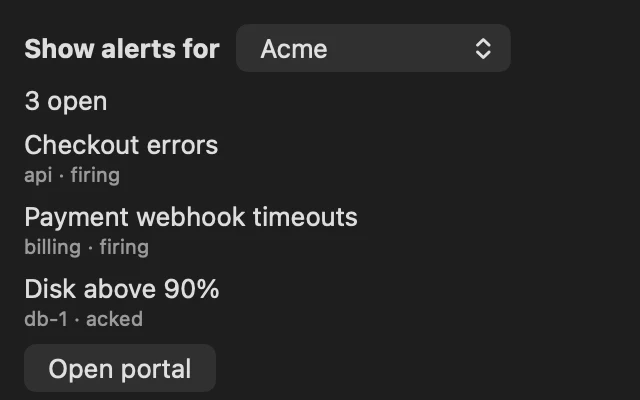
- The menu bar shows what’s open. The icon turns red with a count when something is firing; open it for the latest few alerts, one click each to open, and a button to the portal.
- Every team you’re on. Notifications arrive for all of them; the list shows one team at a time, with a picker when you have several.
- Self-hosted boxes too. Join a box with its code or sign in to it, and a click opens that box’s own portal instead of pingtower.com.
- It stays out of the way. No Dock icon, and it can launch at login.
Installing
Open the disk image and drag Pingtower to Applications. It’s notarized by Apple, so it opens like any other app. Sign in with your Pingtower email and password, pick a team if you’re on more than one, and allow notifications when macOS asks. No account yet? Start free first.
Once a day it checks this site for a newer version. When there is one, the menu says so and Download fetches the new disk image; you install it the same way.
The small print
It’s deliberately small. Acknowledge is the only thing you do from the Mac; resolving, rules, logs and checks live in the web app, which the Mac opens for you. The menu only holds what you need before the browser does.
Critical alerts are an iPhone thing. On the Mac, pages are ordinary notifications, so a Focus mode can hold them unless you allow Pingtower in it. The Mac is for the hours you’re at a desk; keep the phone as the pager for the hours you’re not.
It’s a direct download, not on the Mac App Store. Windows is next on the roadmap.